


PDF Reader – Reader & Editor
4.0387.00 Reviews
App Specs
- Version
- 4.10.9
- Updated On
- License
- Free
- Downloads
- 5,000,000+
- Developer
- Ora Tools
- Categories
- Tools
- Platform
- Android
Screenshots
 Analysis by AppCompare
Ever found yourself in a pinch, needing to open a PDF on your phone but struggling to find the right app? Well, let me introduce you to PDF Reader – Reader & Editor. This app is like having a Swiss Army knife for PDFs right in your pocket. Whether you’re a student, a professional, or just someone who deals with PDFs regularly, this tool is pretty much a lifesaver.
What the free starting point means
There is a useful distinction to make before relying on it: the app is free to download, while in-app purchases range from $3.99 to $89.99 per item. That gives you a no-cost way to try its PDF workflow, but it does not mean every capability or purchase has the same value for every reader. I would start with the tasks I actually need—opening documents, marking them up, or completing a form—and only consider paying if a specific limitation gets in the way.
That approach matters because PDF tools are easy to accumulate and easy to abandon. If you mostly open a document once in a while, a free reader already on your phone may be enough. If you regularly annotate, sign, reorganize, and revisit files, bringing those jobs together can save small amounts of time throughout the week. I would judge any paid option by that practical difference, rather than assuming that a higher-priced item is automatically necessary.
How it fits into a real document routine
Imagine receiving a school permission form or a work document while away from your computer. You can open the PDF, read it on your phone, add notes or a signature, and keep the file handy instead of waiting until you get home. For a longer report, you might search for a phrase first, then mark the relevant passage so it is easy to return to later. These are modest steps, but they make a phone a more useful place to handle documents rather than merely view them.
There is also a sensible way to avoid turning the app into a dumping ground: use recent files to resume current work, and merge or split documents only when the result will be easier to manage. For example, separating a large file into a section you need to send or read can make the next step clearer. Before changing an important document, keep an untouched copy if you may need to compare versions later. That is a general document-handling precaution, not a special feature, but it can prevent a rushed edit from becoming a headache.
Where a dedicated PDF tool has an edge
Compared with a basic viewer, the appeal here is having reading and editing tasks under one roof. A lightweight reader can be the better choice if you only need to open a file quickly and want as few extra controls as possible. A desktop PDF editor is usually more comfortable for substantial revisions, detailed layout work, or long sessions with many pages. I see this app as a practical middle ground for phone-sized jobs: reviewing, annotating, signing, filling, and organizing without reaching for a computer every time.
Cloud access can help when you move between devices, but I would still think about which copy is current before editing. If a document exists both on the phone and in a cloud account, opening the wrong version can lead to duplicated work. A simple habit—check the file name and location, then confirm where the edited copy ends up—makes the convenience more dependable. For sensitive paperwork, I would also be deliberate about which account or storage location I choose rather than treating every document as something to share automatically.
Worth Reading Before You Choose

EA SPORTS FC Mobile 26 Is a Bigger Football Game, but It Takes Time

Flipboard Shows What News Apps Must Do Beyond the Feed

Switching to Android Auto Means Rethinking Your Driving Routine

Google Calendar Makes a Crowded Week Easier to Manage

Ludo King Makes the Most of the Minutes Between Plans

Baby Panda World Brings Quick Play to Modern Phones, but Its Game Library Feels Busy
Who is likely to get the most from it?
I can see it suiting students who mark up readings, people who sign or fill forms on the go, and anyone who keeps a working collection of PDFs across local and cloud storage. It is also useful for someone who wants to search inside a long document instead of scrolling page by page. The strongest case is repeated, varied use: when a reader, annotation tool, form helper, and basic organizer all get used, having them together is more worthwhile than installing a separate app for every small task.
On the other hand, I would skip it if your PDF needs are rare and your current viewer already opens documents comfortably. I would also choose a computer-based editor for intricate changes that depend on precise page layout, or a simpler app if you find extra tools distracting. A phone screen has limits even with text reflow, and a feature-rich toolbox does not make lengthy editing as comfortable as a larger display.
Simplifying Your PDF Experience
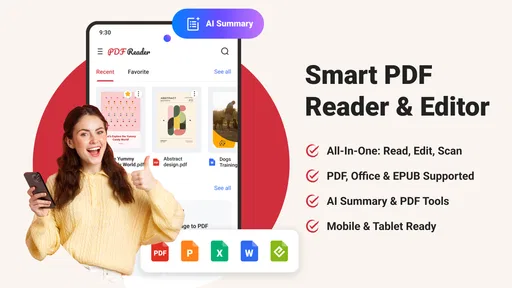
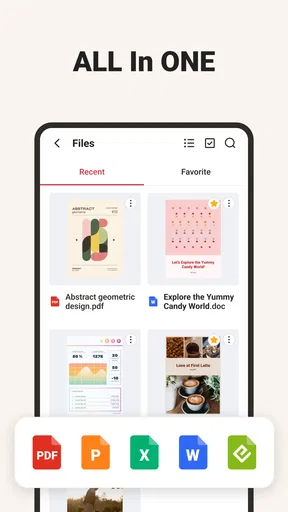
First off, let me just say that the PDF Reader – Reader & Editor is super user-friendly. The interface is clean and intuitive, which means you won’t need a manual to figure out how it works. The main screen greets you with your recent PDFs, making it a breeze to pick up where you left off. Plus, you have quick access to all your files, whether they’re stored locally or in the cloud.
One of the standout features is the seamless integration with cloud services. You can easily link your Google Drive, Dropbox, or OneDrive accounts, allowing you to access your files from anywhere. It’s like having your entire digital library at your fingertips.
Editing Magic
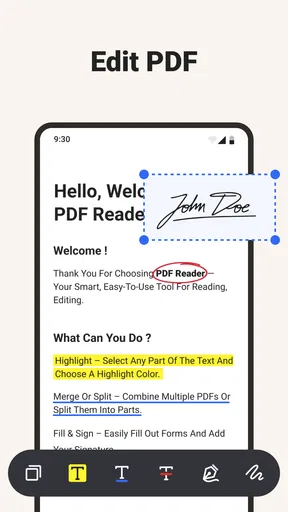
Now, let’s talk about editing – because what’s a PDF reader without some nifty editing tools? This app doesn’t disappoint. You can highlight text, add notes, and even draw directly on the PDFs. Need to fill out a form? No problem. The app supports form filling, so you can complete documents right on your device.
One feature I particularly love is the ability to add signatures. Whether you’re signing a contract or just adding a personal touch, it’s straightforward and effective. You can save your signature for future use, which is a nice little time saver.
Reading Made Easy
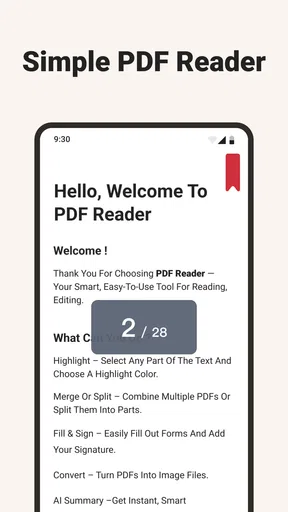
Reading PDFs on a small screen can be a hassle, but the app has thought this through. With the text reflow feature, you can adjust the text size for comfortable reading without losing the document’s format. It’s a game-changer for those long reports or e-books.
And, if you’re like me and enjoy reading at night, the night mode is a godsend. It’s easier on the eyes and doesn’t disturb your partner if you’re reading late into the night.
Additional Features Worth Mentioning
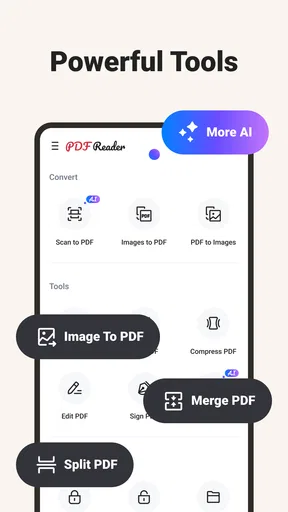
Aside from the essentials, PDF Reader – Reader & Editor comes packed with some handy extras. For instance, you can merge multiple PDFs into one document or split a large file into smaller parts. This is especially useful if you’re dealing with extensive reports or presentations.
The search function is also top-notch. Finding specific text within a document is fast and efficient, which is crucial when you’re pressed for time.
Plus, the app supports multiple languages, making it accessible to a wider audience. It’s a small detail, but it reflects the app’s versatility and attention to user needs.
Final Thoughts
As a tools app from Ora Tools, it has found a sizable audience: it has a 4.4 average from around 13,000 ratings and over 1 million installs. It is free to download, rated for Everyone, and version 4.9.2 is the current release. The app was released on July 4, 2025, and lists a minimum OS requirement of 8.1. Those details make it approachable to a broad range of users, though I would still check that the version available for my device supports the system I use.
All in all, if you’re looking for a comprehensive tool to handle your PDFs, look no further than PDF Reader – Reader & Editor. It’s packed with features that make handling PDFs a breeze, whether you’re reading, editing, or organizing them. The app is available for both Android and iOS, so you can enjoy its benefits no matter your device.
In a world where digital documents are king, having a reliable PDF tool is essential. This app delivers on all fronts, combining functionality with ease of use. So, why not give it a try? You might just find it’s the only PDF app you’ll ever need.
My practical verdict is to try it free with a document you already know well: a form, a report, or a set of notes. Check whether the reading controls suit your screen, whether your annotations are easy to find later, and whether your edited file is saved where you expect. If that everyday test makes your routine smoother, the combination of tools may be worth keeping. If you only need a quick viewer, or prefer to do careful editing on a computer, there is no reason to pay for more than you use.
Pros
- User-friendly interface for easy navigation.
- Supports multiple file formats seamlessly.
- Annotate and highlight with precision.
- Offline access to saved documents.
- Fast loading times for large files.
Cons
- Ads can be intrusive during use.
- Limited free features; premium needed.
- Occasional crashes on older devices.
- No cloud sync for automatic backup.
- Editing tools lack advanced options.
FAQs for PDF Reader – Reader & Editor
What features does PDF Reader – Reader & Editor offer?
PDF Reader – Reader & Editor provides a comprehensive suite of tools for managing PDF files. Users can view, annotate, edit, and convert PDFs with ease. Additionally, the app supports cloud storage integration, allowing for seamless access across devices. Its intuitive interface makes it user-friendly for both beginners and seasoned users.
Is PDF Reader – Reader & Editor free to use?
The app offers a free version with basic features suitable for everyday PDF viewing and editing needs. However, to unlock advanced functionalities such as OCR (Optical Character Recognition) and more sophisticated editing tools, users may need to purchase in-app subscriptions or one-time upgrades.
How does PDF Reader – Reader & Editor handle privacy and security?
PDF Reader – Reader & Editor prioritizes user privacy and security by ensuring that all files are stored locally unless explicitly uploaded to a cloud service. The app does not access or share your documents without your consent, and it supports password protection for sensitive files.
Can I edit text within a PDF using PDF Reader – Reader & Editor?
Yes, the app allows users to edit text directly within PDF files. This feature is particularly useful for correcting typos or adding additional information. It also supports text formatting options, enabling users to change font size and style according to their preferences.
Does PDF Reader – Reader & Editor support collaboration features?
The app supports collaboration by allowing users to annotate and comment on PDFs, which can then be shared with others via email or cloud services. This makes it ideal for team projects where multiple users need to review and provide feedback on a single document.


